What to put in your digital guest guide, and what to leave out
Every guest who arrives asks you the same things as the last one: how do I get in, what’s the WiFi, and now and then where does the trash go. The guide is the page that answers that before they ask. After building dozens of guides for properties in Mexico, this is what we put in, and what we stopped putting in.
Look at a real one first
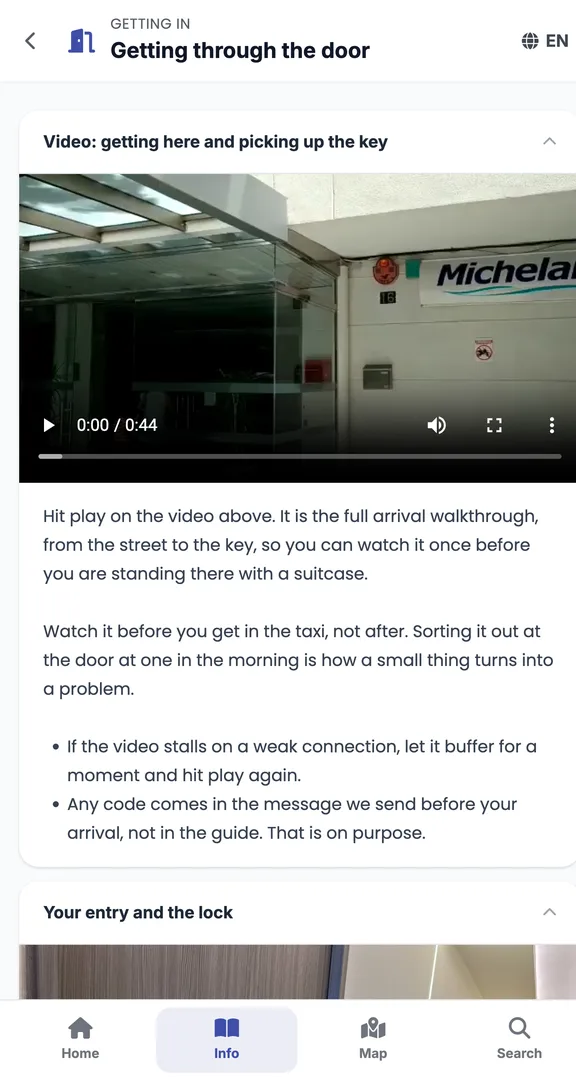
Before the list, open this one. It’s the guide for an apartment in Anzures, Mexico City, exactly as the guest sees it on their phone. Six sections, and the guest installs nothing and creates no account.
What goes in
1. How to get in, first. It’s the question that arrives at midnight. A photo of the door, one of the lockbox or the smart lock, and the steps in order. Don’t put the lock code in the guide: the guide is a link, and links get forwarded. The code goes out by message on arrival day, and the guide says “the code reaches you on WhatsApp”.
2. The WiFi, ready to copy. Write the network name and password as text, so the guest can copy and paste them; you can’t copy from a photo of the router. If the password has an l and a 1 in it, change it before someone messages you.
3. The rules, few and positive. Quiet hours, what to do with the trash, whether smoking on the terrace is fine, checkout time. With five rules the guest reads them. With twenty, honestly, they read none. And write them as permission: “you can use the terrace until 10” gets followed more than “no noise allowed”.
4. Directions and what’s nearby. The address with a map pin, where to park and how to get into the building if there’s a doorman. And just three or four useful places: the pharmacy, the supermarket, where to get breakfast. In Anzures we put 21 pins and the ones that get opened are always the same four.
5. What they can request and pay for right there. A late checkout, an extra clean, a crib. If the guide lets them request and pay, the guest does it alone and you see it come in. If not, they ask you by message at 11 pm, you negotiate it yourself, and then it’s on you to tell the cleaner they start later tomorrow.
6. What to do if something fails. The power went out, no hot water, the door won’t open. Write one line per case and who to message, and the guest doesn’t have to call you.
What to leave out
A three-paragraph welcome. To be honest, nobody reads it. One line with your name is enough.
Forty photos. The guest already saw the photos on Airbnb before booking. In the guide they only need the ones that help them get in and find things, which tends to be four or five.
Your personal number at the top. Put it first and they message you about everything, and your personal WhatsApp fills up with questions about the house. It goes at the end, under “if something fails”.
A PDF. It opens badly on a phone, when you change something you have to send it again, and nobody can copy a WiFi password out of a PDF. Better a page that opens with one tap.
How you send it
The link goes in your arrival message, one or two days before check-in, in the same Airbnb or Booking chat. One line: “Here’s the guide for the house, with how to get in and the WiFi”. If the guest opens it before arriving, they don’t message you from the taxi.
Airbnb’s guidebook is a list of your favourite places to recommend, and it’s fine to have one. The house guide explains your house, how to get in and the WiFi, which is what the guest needs at eleven at night.
Want the guide for one of your properties?
We build it for you, for free, for as many properties as you want. Send us your listing link and we start from there.
Is this the same as the Airbnb guidebook?
No. The Airbnb guidebook is your list of local recommendations, and it lives inside the Airbnb app. The house guide is your own page, with how to get in, the WiFi and the rules, and it opens from a link in any chat.
How much does it cost to build?
Nothing. We build it from what’s already in your listing, and then you change whatever you want. If you have 20 properties, we build all 20.
What if I change the WiFi or a rule?
You edit it and it’s done. The link stays the same, so a guest who already has it sees the new version without you sending anything.
He wrote and checked this page. Every source is public and linked above.