How to check an Airbnb clean without going to the property
With one property you go and check it yourself. With three, at checkout time you’re already doing a thousand things and can’t get to all of them. But you can see the photos of every room before the guest arrives, with the time they were taken. This is how we do it at Upbridge, and how you can start today even if you use no tool at all.
What doesn’t work
Today almost everything runs on WhatsApp, and what you get is an “all done”. You message the cleaner, they reply that, and on that you let the guest in. Without a photo, “all done” is an opinion, and the guest sometimes has a different one. When the place isn’t done, you find out from the guest, who pretty much ends up as the messenger.
Loose photos in the chat help a bit more, but they arrive out of order, between voice notes and stickers, and WhatsApp compresses them. The time you see is when they were sent. And two weeks later, to find the bathroom photo from the 11th, you scroll up through the whole chat looking for it.
The “all done, boss” voice note doesn’t do it either, because you can’t forward it to Airbnb.
The photo report with times
The cleaning list the cleaner follows has items that ask for a photo: the made bed, the bathroom with the shower in view, the kitchen. Each of those photos is saved with the time, the date and who took it, and none of that can be edited afterwards. The full list is in our room-by-room cleaning checklist.
With that, the report builds itself, room by room. You open it on your phone, see the kitchen, the bathroom and the bedroom, and you know what time the cleaner finished. If check-in is at three and the report says the property was done at half past eleven, you’re set. This is what a kitchen’s looks like:
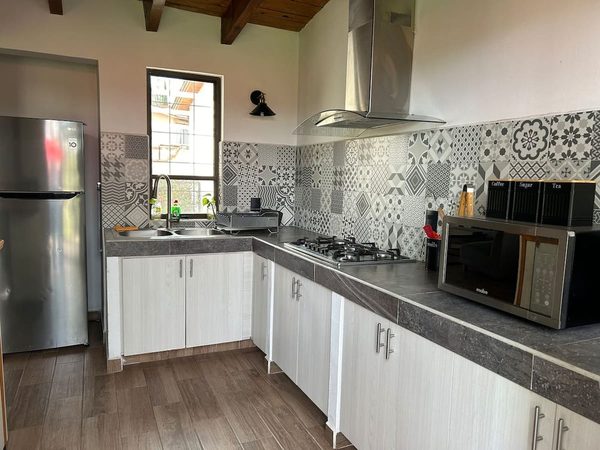
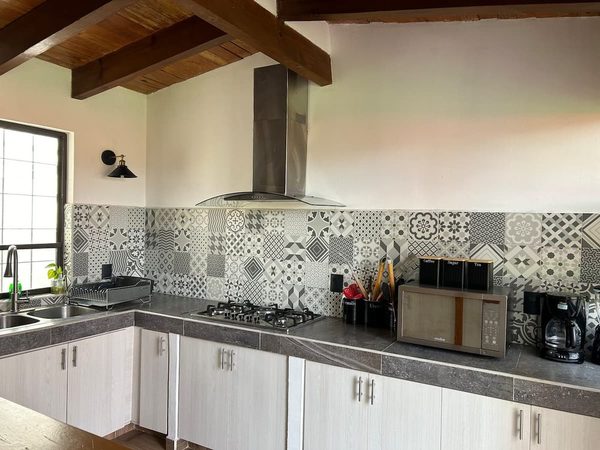
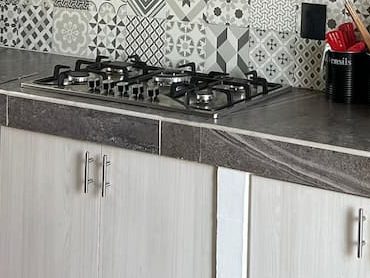
You check the report instead of the property: three photos of the kitchen that take ten seconds, and if one doesn’t convince you, you message the cleaner with that photo in hand.
What Cleo checks in each photo
Cleo is our AI operations assistant, and she’s the one who runs each clean over WhatsApp. When the photos come in, she first checks that the photo each item asked for is there. If the balcony one is missing, she asks the cleaner for it, without going through you.
Then she looks at what’s in the photo. Mold in the shower, say, or a badly made bed. If she sees something she tells you and proposes what to do. She only messages someone once you say yes.
Casa Palma was ready at 11:42 and I’ve checked all 24 photos.
There’s mold in the upstairs shower. Should I offer the owner a deep clean?
Yes, send him the proposal
Done. I also ordered 6 rolls of toilet paper, they would have run out by Friday.
Mold in the shower is the example we use most because it’s the classic thing nobody sees from an “all done”. The cleaner sees it every day and no longer notices it. The guest does, on day one, and puts it in the review. Cleo sees it in the photo and proposes offering the owner a deep clean before that review lands.
The same goes for what’s missing. After each checkout the cleaner counts the towels and the sheets, and if two towels are gone Cleo notes it before the next guest arrives.
If something gets argued, the photo already exists
A guest messages you at four in the afternoon: the bathroom was dirty. Before, that got argued from memory, with “I told her to clean it”. Now you open that room’s report, see the shower photo with its time, and send it over. The conversation usually ends there.
And if it doesn’t end there, Airbnb has a process for when a guest says the place wasn’t clean, and in the Resolution Center both sides present what they have. What you have is a photo with a time, taken before check-in. A voice note from the cleaner doesn’t count there.
It works the other way too. The first photo on our list is of how the cleaner found the property, before moving anything. That’s the one that helps if the departing guest broke something and tells you “that wasn’t me”.
How to start today, with no tool at all
Honestly, you don’t need software to start. Ask your cleaner for four fixed photos, always the same ones in the same order. We’d ask for the made bed, the bathroom with the shower in view, the kitchen and the living room. Set up one WhatsApp group per property and have the photos sent there, nothing else.
That alone gets rid of the “all done”. In a few weeks you’ll find that looking for the photo from the day that matters becomes a trip through the chat, and that the time you have is when it was sent, which isn’t when it was taken. When that happens, the page below explains what comes next.
Want the guide for one of your properties?
We build the guest guide for you, for free, for as many properties as you want. Send us your listing link and we start from there. And if you want to see how a cleaning report reaches you, the page is right below.
What about things a photo doesn’t show?
The damp smell, say, or whether the hot water works. That’s why the list has items that get ticked without a photo, and why the first clean of a new property is worth seeing yourself. After that, the rest you ask about.
Who takes the photos?
The cleaner, from the same WhatsApp chat where they received the property, which is the WhatsApp they already use. An item that asks for a photo only gets ticked once the photo is there.
Can the photos be edited afterwards?
No. Time, date and author stay fixed. That’s the difference from a WhatsApp album.
He wrote and checked this page. Every source is public and linked above.